Most articles about school scheduling software talk about why you should switch. This one is about mechanics: what an automated timetable module actually needs to run, how it avoids double-booking a teacher or a lab, and what happens the moment a teacher calls in sick mid-term. If you already want the business case for moving off spreadsheets, our earlier piece on AI timetable software covers that. This one is for anyone who wants to understand how the thing actually works before they trust it with 40 sections and 60 teachers.
What an Automated Timetable Module Actually Needs Before It Can Build Anything
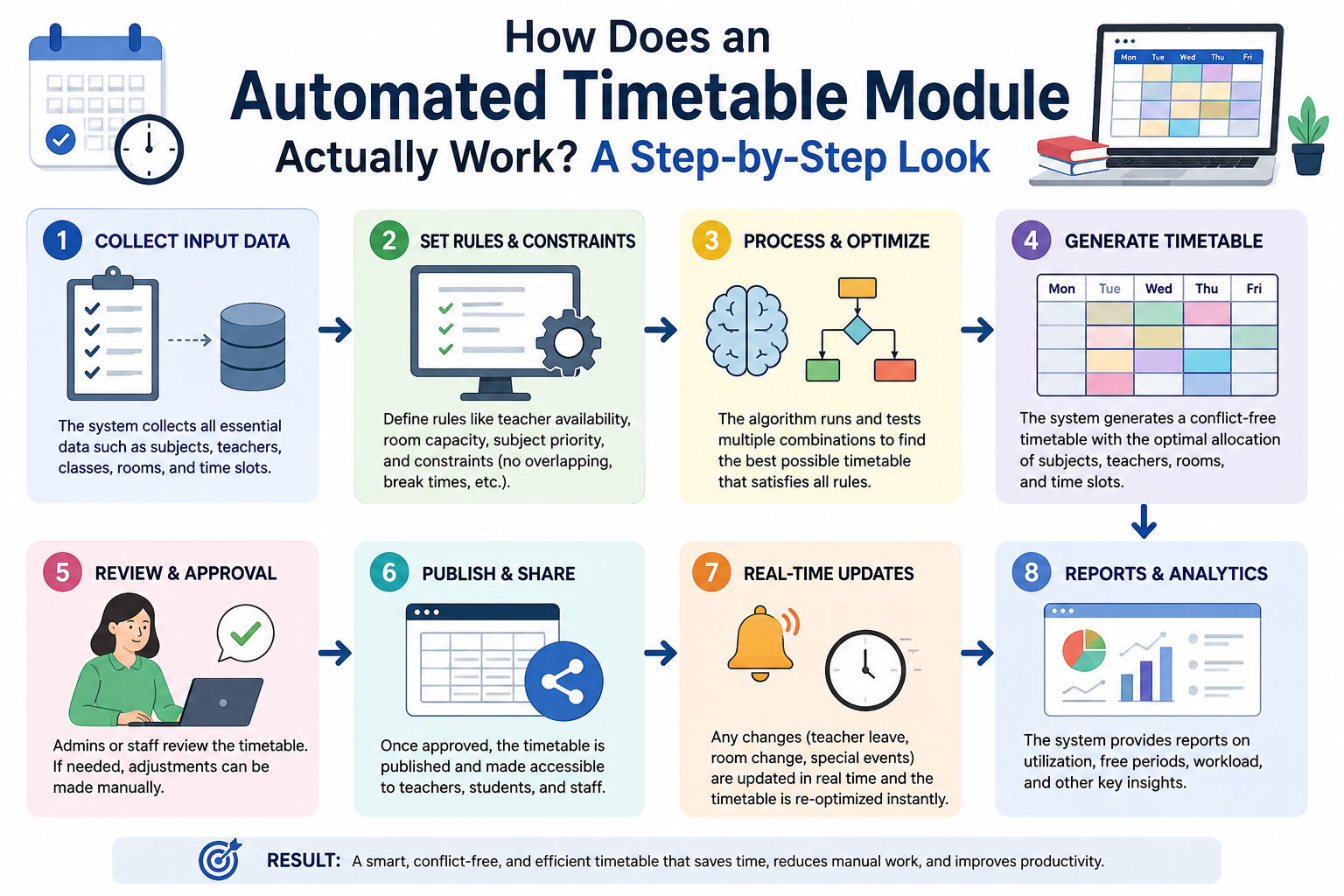
An automated timetable module isn't magic, it's a constraint solver, and constraint solvers are only as good as the data you feed them. Before any schedule gets generated, the system needs:
-
Teacher availability and workload limits, including which subjects each teacher is qualified to teach and any periods they're unavailable.
-
Subject and period requirements, how many periods per week each subject needs, and whether any subjects need double periods (labs, for example).
-
Classroom and lab capacity, so a 45-student section doesn't get assigned to a 30-seat room, and lab sessions only land in rooms with the right equipment.
-
Section and division structure, how many sections exist per grade and which teachers are assigned to which sections.
-
School calendar data, working days, period timings, and the holiday calendar, so the module isn't scheduling classes on a day the school is closed.
Everything downstream depends on this input being accurate. A module that generates a "perfect" timetable from incomplete data will still produce a broken schedule, it's just following bad instructions precisely.
How Conflict Detection Actually Works
The core job of any automated timetable module is preventing three kinds of clashes at once, for every period, across every section:
-
Teacher double-booking: the same teacher can't be assigned to two sections in the same period. This is the single most common manual scheduling error, and the one that causes the most disruption when it's caught late.
-
Room or lab double-booking: two sections can't be assigned the same physical room or lab in the same period.
-
Student-facing clashes: within a section, no student should have two subjects scheduled in the same period.
Rather than generating a full timetable and then checking for clashes afterward, a well-built module checks constraints as it places each period, so it never creates an assignment that breaks a rule in the first place. When it hits a slot where every available option would create a clash, it backtracks and tries a different arrangement instead of forcing an invalid schedule through.
What Happens When Something Changes Mid-Year
This is where "automated" actually earns the word, and it's the part manual timetabling handles worst. A few common mid-year scenarios:
-
A teacher takes leave. The module can suggest substitute assignments from teachers who are free and qualified for that subject in that exact period, instead of an admin manually scanning the entire timetable to find a match.
-
A new section is added. Rather than rebuilding the whole schedule by hand, the module re-solves around the existing constraints and slots the new section in without disturbing timetables that are already working for other classes.
-
A holiday gets added or moved. Periods that would have fallen on that day get redistributed automatically instead of someone manually shifting a week's worth of classes.
A school in Ghaziabad that built its timetable manually needed roughly two weeks to finalize it, and still made more than 60 changes in the first month as real-world adjustments came in. That second number, the ongoing changes after launch, is really where an automated module pays for itself. The initial build is one-time work; the adjustments never stop.
Manual Timetabling vs. an Automated Timetable Module
|
Manual (spreadsheet) |
Automated Timetable Module |
|
|
Initial build time |
Days to weeks |
Minutes to hours |
|
Conflict checking |
Manual review, error-prone |
Built into generation |
|
Mid-year changes |
Manually re-checked by hand |
Re-solved automatically |
|
Substitute suggestions |
Admin searches manually |
System suggests qualified, free teachers |
|
Scales with new sections |
Gets harder every year |
Same process regardless of size |
Where the Timetable Module Fits Into a Broader School Management System
A timetable module that only lives on its own doesn't do much beyond the initial build. Its real value shows up when it's connected to the rest of a school management system: teachers see their personalized schedule directly in their own panel, students and parents see the class timetable through the same app they use for attendance and homework, and any change made in the timetable module (a substitute, a shifted period) reflects everywhere it needs to without someone re-entering it in three different places. That's the difference between "software that makes a timetable" and a module that's actually part of how the school runs day to day. You can see how the timetable module sits alongside attendance, fees, and exam management on LMSCloud's features page.
Frequently Asked Questions
Does an automated timetable module require technical staff to operate?
No. Once the initial data (teachers, subjects, sections, calendar) is entered, generating and adjusting a timetable is a standard admin task, not something that requires IT skills.
Can teachers request preferred periods?
Yes, most systems allow teacher preferences to be entered as soft constraints, meaning the module will try to honor them where possible without breaking the hard constraints (no double-booking, no capacity overruns).
What happens if the module can't find a valid schedule?
It flags the specific conflict, for example, too many periods requested for the classrooms available, so an admin can adjust the input (add a room, reduce periods) rather than getting a silently broken timetable.
How is this different from just using a spreadsheet template?
A spreadsheet doesn't check for conflicts automatically or re-solve itself when something changes. Every adjustment in a spreadsheet has to be manually cross-checked against every other assignment, which is exactly where errors creep in.
Does the timetable module work differently for labs versus regular classrooms?
Yes. Lab sessions typically need double periods and rooms with specific equipment, so the module treats them as a separate constraint from standard single-period classroom subjects.
Want to see how this actually looks running on a real dataset? Try the LMSCloud demo school and generate a sample timetable yourself, no sales call required first.